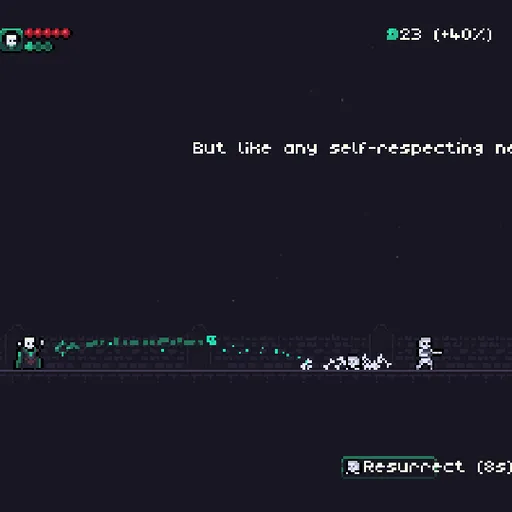
Norman the Necromancer is a side-view pixel-art action game about a bookish wizard who would rather be left alone. The villagers disagree, and they keep marching in from the right side of the screen with pitchforks, bows and armor. You fling green spells at them in high arcs, then bring the fallen back as skeletons that fight on your side. Dan Prince made the game in 2022 for the js13k contest, where the whole entry had to fit in 13 kilobytes.
How to Play Norman the Necromancer
Norman stands at the left edge of a graveyard wall. Enemies walk toward him in waves, and anyone who reaches him deals damage equal to their remaining health. Norman starts with five health orbs, and losing them all ends the run.
Move the mouse to aim and click to cast. Spells fly in a curve and fall with gravity, so you aim above distant targets. You hold three casts at a time, shown as small orbs under your health, and one recharges every second.
Most defeated enemies leave a corpse behind. When the Resurrect bar at the bottom says Space, press it to raise every corpse on the field as a skeleton. Skeletons march to the right and trade blows with the first enemy they meet. The ability then needs ten seconds to recharge.
Each kill drops souls, the game’s currency. After every level a shop opens where you can heal, add a health orb, add a cast, or buy rituals that change your spells. There are ten levels in all, with a rat-charming piper, a portal-summoning wizard and a crowned king who fights in several stages at the end.
Norman the Necromancer Controls
| Action | Keyboard | Mouse |
|---|---|---|
| Aim the spell | — | Move the pointer |
| Cast a spell (also starts the game) | — | Click |
| Raise every corpse as a skeleton | Space (when the cooldown is ready) | — |
| Pause or resume | P | — |
| Choose an item in the shop | Up / Down arrows | — |
| Buy the item, or pick Continue to start the next level | Enter | — |
Tips and Strategies
- Keep your streak alive. Your soul bonus climbs with every cast that hits. Fire at the thick of a group rather than taking long shots at lone archers.
- Save corpses for a crowd. Resurrection raises every body at once. Waiting until several enemies are down gives you a whole squad instead of one skeleton.
- Mind the shells and shields. Shell knights take no damage while tucked in, and royal guards reflect spells. Time your shots for the moment they open up.
- Kill monks first. A monk heals every living enemy on the field each time it acts, which can undo a lot of your work.
- Shop with a plan. The shop offers two common rituals and one rare one, and prices rise level by level. A Recharge or Renew early on often helps more than a costly ritual.
Features
- Ten levels with mini-bosses and a final fight against the king, followed by an ending scene.
- Twenty rituals such as bouncing, homing or splitting spells, bleed, freezing, lightning strikes and giant skeletons.
- Undead allies raised from the bodies of the enemies you defeat.
- Synthesized organ music whose instruments change between the battle and the shop.
- Crisp pixel art scaled up to fit your screen.
Tested and updated: