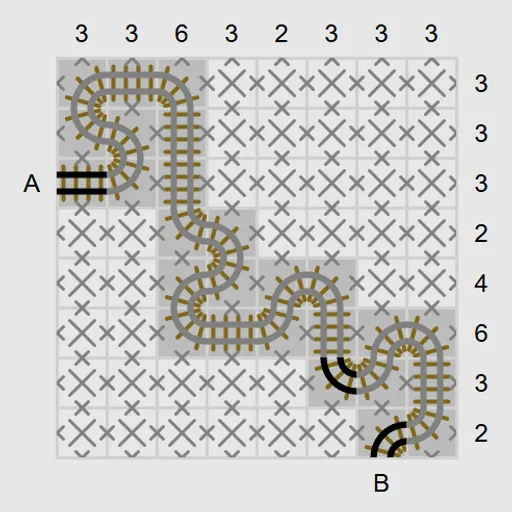
Train Track Logic puts you in charge of finishing a railway. A few rail pieces are already on the map, along with the two ends of the line, A and B. The numbers along the top and right edges tell you how many squares in each column and row carry track. Your task is to lay a single route that fits those counts exactly. It is Tracks, written by James Harvey for Simon Tatham’s Portable Puzzle Collection.
How to Play Train Track Logic
The line starts at A on the left edge of the grid and ends at B on the bottom edge. In between, it may only use straight rails and 90-degree curves. It cannot cross itself, branch, or loop back on itself.
Each column clue on top counts the squares in that column that contain track, and each row clue on the right does the same for its row. Any piece that is printed at the start belongs to the solution.
Click the edge between two squares to lay rails across it, linking the two squares. Right-click an edge to put a cross on it when you know the line cannot pass there. Clicking inside a square places a colored marker that means “track goes through here,” while right-clicking places a cross that means “no track.” Dragging across squares marks a whole row or column at once, which helps when a clue is already full. A clue turns red when its row or column holds too much track, and the map flashes when the route is complete.
The Type menu offers twelve presets from 8x8 to 15x15, at Easy, Tricky or Hard difficulty.
Train Track Logic Controls
| Action | Keyboard | Mouse | Touch |
|---|---|---|---|
| Lay a track piece across an edge | Arrow keys to move onto an edge, then Enter | Left-click the edge between two squares | Tap the edge with Tap set to Track |
| Mark an edge as "no track here" | Space on an edge | Right-click the edge | Press and hold the edge, or set Tap to Cross and tap |
| Mark a square as "has track" / "no track" | Enter / Space on a square | Left-click / right-click inside the square | Tap / press and hold inside the square |
| Mark a whole line of squares | — | Left- or right-drag across several squares | Drag (press and hold first for crosses) |
| New game, undo, redo | N, U, R | Menu buttons above the grid | Menu buttons above the grid |
Tips and Strategies
- Fill in rows and columns with a clue of 0 or a clue equal to their length first.
- A square with track must use exactly two of its four edges. When two edges are crossed out, the other two are forced.
- Extend the given pieces right away. Each one points at a neighbor that must also carry track.
- When a row’s count is already met, drag crosses across the rest of it to keep your board readable.
- Avoid closing a loop. A route that circles back on itself can never reach both A and B.
- Count corners as you go. A track that needs to cover a far column has to turn toward it somewhere.
Features
- Twelve presets in five sizes, up to a 15x15 map, plus custom sizes
- Square markers and crosses for notes, alongside real rails
- Drag to mark whole lines, on desktop and on touch screens
- Unlimited undo and redo and a Solve button
Tested and updated: