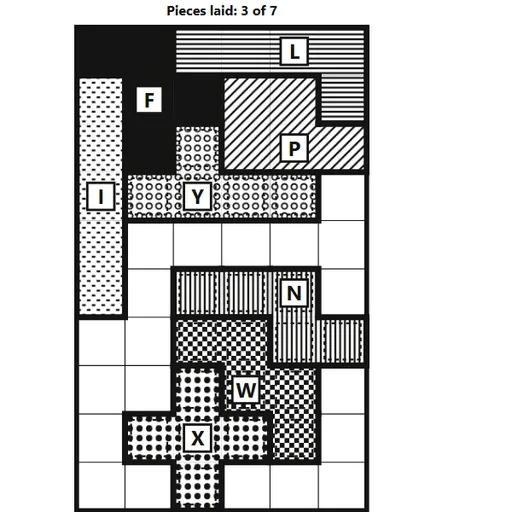
Five-Square Tiling Puzzle asks you to fill a rectangle with flat pieces, each made of five squares joined edge to edge. There are twelve such shapes, and each one is named for the letter it resembles. Fitting them together sounds easy until the last two pieces refuse to go in. The puzzle comes from Christopher Müller’s open-source PaperGames collection and works with taps only, with no dragging.
How to Play Five-Square Tiling Puzzle
Choose a piece from the tray below the board. Its shape appears next to the Turn and Flip buttons with a small dot on one square. Turn or flip it until it faces the right way, then tap the board square where that dot should land. Tap a laid piece to lift it back into the tray.
The goal is to cover every square of the rectangle exactly once. A counter shows how many pieces are down. When the board is full, the puzzle is solved.
Free laying is open-ended: any arrangement that fills the board counts. Easy uses five pieces in a 5 by 5 square, Medium uses eight in a 5 by 8 board, and Hard uses all twelve on a field size of your choice. Start pieces given locks a few pieces onto a 6 by 10 board. You then lay three, five or seven more, and only one arrangement works.
Five-Square Tiling Puzzle Controls
| Action | Keyboard | Mouse | Touch |
|---|---|---|---|
| Choose a piece | Tab to the piece in the tray, then Enter | Click the piece below the board | Tap the piece below the board |
| Turn or flip the chosen piece | Tab to "Turn" or "Flip", then Enter | Click "Turn" or "Flip" | Tap "Turn" or "Flip" |
| Lay the piece | Tab to the square where the piece's dot should go, then Enter | Click the square where the piece's dot should go | Tap the square where the piece's dot should go |
| Lift a laid piece | — | Click the piece on the board | Tap the piece on the board |
| Ask for help | — | Click "Hint" | Tap "Hint" |
Tips and Strategies
- Fill the corners and edges first. Pieces with long straight sides, like I, L and U, fit along the border and leave a cleaner space in the middle.
- Place the X early. The cross-shaped piece is the hardest to fit because it needs open space on all four sides of its center.
- Check for dead gaps. Any empty area that is not a multiple of five squares can never be filled. Fix it before you lay more pieces.
- Try the narrow fields on Hard. The 3 by 20 board allows very few arrangements, so it feels more like a logic puzzle than a free fit.
- Flip before you give up on a piece. Several shapes, such as N, F and Z, look different when mirrored, and the flipped side may be the one that fits.
Features
- Twelve lettered pieces with distinct black-and-white patterns
- Free laying at three levels and four field sizes on Hard
- Start pieces given puzzles with exactly one solution
- A hint that shows where a piece goes or which one to remove
- Your current board is saved in the browser and comes back after a reload
Tested and updated: