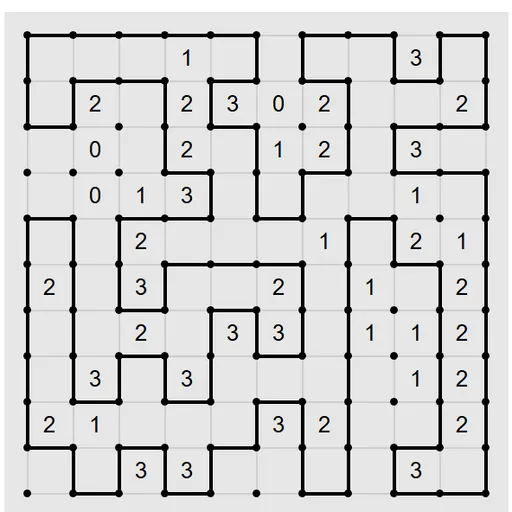
Loopy Loop Puzzle asks you to draw one closed loop through a grid of dots. Numbers inside the cells tell you how many of that cell’s sides the loop uses. It sounds plain on a square grid, yet the same rules also run on triangles, hexagons and tilings that never repeat. Mike Pinna wrote it for Simon Tatham’s Portable Puzzle Collection, and Lambros Lambrou later added the unusual grid shapes.
How to Play Loopy Loop Puzzle
Every candidate line starts out yellow, which means undecided. Click a line to turn it black and add it to your loop. If you know a line is not part of the loop, rule it out so it fades. Clicking the same line again returns it to yellow.
The finished drawing must be a single ring that never crosses, branches or splits into pieces. Each numbered cell must have exactly that many of its sides on the loop. Cells without a number can have any count. When the loop is correct, the board flashes to show you won.
The default board is 10x10 squares at Easy. From the Type menu you can pick Easy, Normal or Hard square grids in two sizes, or one of many other tilings at Hard. Custom lets you combine any grid type and size with Easy, Normal, Tricky or Hard.
Loopy Loop Puzzle Controls
| Action | Keyboard | Mouse | Touch |
|---|---|---|---|
| Mark a line as part of the loop (click again to clear) | — | Left-click the line | Tap the line |
| Rule a line out (click again to clear) | — | Right-click the line | Press and hold the line |
| New game, undo, redo | N, U, R | Menu buttons above the grid | Menu buttons above the grid |
Tips and Strategies
- Rule out around zeros first. A 0 means none of its sides are used, so mark all of them out right away.
- Look at 3s side by side. Two 3s next to each other on a square grid always use the line between them and both outer lines parallel to it.
- Check every dot. A dot with two black lines is full, so rule out its other lines. A dot with one black line and one open line must continue along that open line.
- Watch for early rings. A small closed ring is wrong unless it is the whole answer, so do not close one too soon.
- Corners are strong. A 3 in a corner of a square grid must use both outer edges.
- Start a new shape on Easy settings through Custom before trying it at Hard.
Features
- Eighteen grid types, from squares and triangles to Penrose, hat and spectre tilings.
- Four difficulty levels in Custom (Easy, Normal, Tricky, Hard) that pair with any grid.
- Ruled-out marks that can be shown faintly or hidden.
- Optional auto-follow that extends a click along forced chains.
- Unlimited undo, restart and Solve.
Tested and updated: