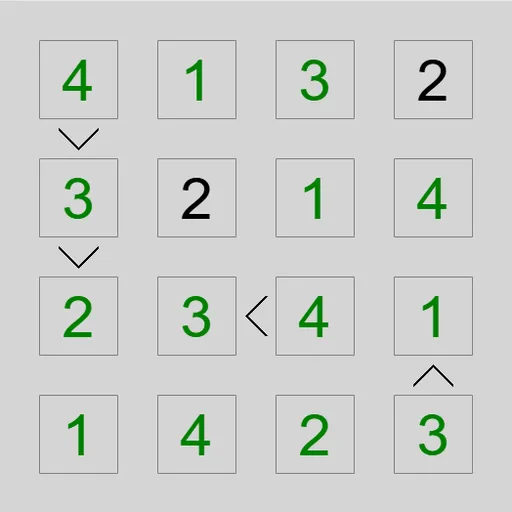
Greater-Than Grid is a digit puzzle where small signs between squares do most of the talking. You fill the grid so no row or column repeats a number, while every sign points the right way. It is Unequal, written by James Harvey for Simon Tatham’s Portable Puzzle Collection. Besides the classic sign version, it has an Adjacent mode in which bars mark neighbors that are exactly one apart.
How to Play Greater-Than Grid
A grid of size N uses the digits 1 to N. Each digit appears once in every row and once in every column, so a 5x5 grid needs five different digits across each line.
In Unequal mode, a sign between two squares works like the math symbol. The open side faces the bigger number and the point faces the smaller one. Harder puzzles hide some signs, so you get fewer hints to work with. A few squares may also start with digits already filled in.
In Adjacent mode, a bar between two squares means their digits are one apart, such as 3 and 4. Every bar is shown here, so two neighbors without a bar can never be consecutive.
Select a square and type a digit to fill it, or right-click first to add pencil marks instead. When the whole grid is valid, the puzzle flashes to show you solved it. Presets range from a 4x4 Easy grid to 7x7 Extreme, and Custom lets you choose larger sizes.
Greater-Than Grid Controls
| Action | Keyboard | Mouse | Touch |
|---|---|---|---|
| Enter a digit | Arrow keys to move, then type the digit | Click a square, then type a digit | Tap a square, then tap a digit button |
| Add or remove a pencil mark | Enter switches the cursor to pencil mode, then type a digit | Right-click a square, then type a digit | Set Tap to Pencil mark (or press and hold a square), then tap a digit |
| Clear a square | Space, Backspace or 0 | — | Tap the square, then Clear |
| Fill in every possible pencil mark / also remove the obvious ones | M / H | — | — |
| Grey out a clue sign you have used | Shift or Ctrl + arrow key next to the clue | Click the sign | Tap the sign |
| New game, undo, redo | N, U, R | Menu buttons above the grid | Menu buttons above the grid |
Tips and Strategies
- A square on the small side of a sign can never hold N, and a square on the big side can never hold 1.
- Follow chains. If three squares climb in a row of signs, the first one is at most N minus 2 and the last is at least 3.
- A square that sits on the small side of every sign around it is lower than all those neighbors, which often makes it a 1 or 2.
- In Adjacent mode, the missing bars are clues too. A 1 with no bars around it rules out 2 in every neighbor.
- Press H to fill in pencil marks with the obvious clashes already removed, then trim them with the signs.
- Grey out each sign once both squares are filled, so the unused ones stand out.
Features
- Two rule sets: greater-than signs and adjacency bars
- Twelve presets plus Custom grids, with levels from Trivial to Recursive
- Pencil marks with automatic fill keys, undo, redo and a Solve button
- On-screen digit buttons for touch screens
Tested and updated: