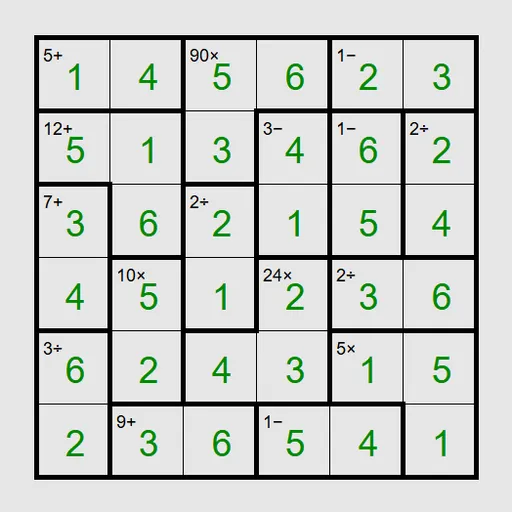
Math Cage Grid mixes a Latin square with quick mental arithmetic. Thick lines split the board into cages, and each cage shows a target number with an operation such as 12× or 7+. You fill every square so the digits in each cage reach that target and no row or column repeats. The puzzle is Keen from Simon Tatham’s Portable Puzzle Collection, and every board has a single answer you can find by logic.
How to Play Math Cage Grid
On a 6x6 board, each row and each column holds the digits 1 to 6 once. The cages add a second layer of rules.
An addition cage must sum to its target, so 7+ over two squares could be 1 and 6, 2 and 5, or 3 and 4. A multiplication cage must multiply to its target. Subtraction and division clues only appear on cages of two squares, and they mean one digit minus or divided by the other gives the target, in either order. A one-square cage simply tells you its digit.
Select a square and type a digit, or right-click first to add pencil marks for the options you are still weighing. The board flashes once every cage and line is correct.
Presets run from a gentle 4x4 to 6x6 Unreasonable, which needs some trial and error, plus a large 9x9 board. Custom games let you pick any size from 3 to 9 and turn on multiplication-only cages.
Math Cage Grid Controls
| Action | Keyboard | Mouse | Touch |
|---|---|---|---|
| Enter a digit | Arrow keys to move, then type the digit | Click a square, then type a digit | Tap a square, then tap a digit button |
| Add or remove a pencil mark | Enter switches the cursor to pencil mode, then type a digit | Right-click a square, then type a digit | Set Tap to Pencil mark (or press and hold a square), then tap a digit |
| Clear a square | Space, Backspace or 0 | — | Tap the square, then Clear |
| Fill every empty square with all pencil marks | M | — | — |
| New game, undo, redo | N, U, R | Menu buttons above the grid | Menu buttons above the grid |
Tips and Strategies
- Start with one-square cages, since they are free digits.
- On a 6x6 board, a 5- cage can only be 1 and 6, and a 2÷ cage must be 1 and 2, 2 and 4, or 3 and 6.
- Factor big products. Any product that includes a factor of 5 needs a 5 in the cage on boards smaller than 10x10.
- Every row adds up to the same total, 21 on a 6x6 board. If a row is covered by whole cages except one square, subtract to find it.
- Two-square addition cages near the extremes are tight. On a 6x6 board, 11+ must be 5 and 6, and 3+ must be 1 and 2.
- Press M to fill all pencil marks at once, then remove the digits each cage rules out.
Features
- Ten presets from 4x4 Easy to 9x9 Normal, plus custom sizes from 3 to 9
- Five difficulty levels, from Easy to Unreasonable
- Optional multiplication-only cages for a factoring challenge
- Pencil marks, undo, redo, Solve, and touch digit buttons
Tested and updated: