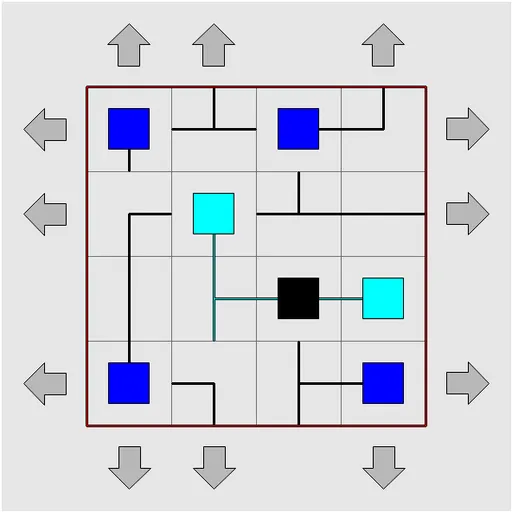
Netslide Pipe Puzzle mixes a pipe network with a sliding tile puzzle. All the pieces point the right way, but they sit in the wrong places, and the only move is to push an entire row or column along by one square. The piece pushed off one end reappears at the other. It was written by Richard Boulton for Simon Tatham’s Portable Puzzle Collection and builds on the same grid generator as the rotating pipe game.
How to Play Netslide Pipe Puzzle
Grey arrows surround the board, one at each end of every row and column. Clicking an arrow shifts that line one square in the direction it points. The black tile is the source of the network, and tiles connected to it are drawn in cyan or with a teal pipe.
Your goal is to rebuild the hidden network so that every tile joins one connected system without any closed loops. The status bar shows your move count and how many tiles are active, such as “Active: 4/16”. When the count reaches the total, the board flashes and the status bar says COMPLETED.
The Type menu offers 3x3, 4x4 and 5x5 boards in three levels. Easy boards show red barrier lines where pipes may not cross. Medium boards drop the barriers. Hard boards also wrap, so pipes can run across the outer edges. Custom lets you pick the size, wrapping and barrier amount.
Netslide Pipe Puzzle Controls
| Action | Keyboard | Mouse | Touch |
|---|---|---|---|
| Slide a row or column in the arrow's direction | Arrow keys to move the marker around the edge, then Enter | Left-click an arrow | Tap an arrow |
| Slide a row or column the opposite way | — | Right-click an arrow | Press and hold an arrow |
| New game, undo, redo | N, U, R | Menu buttons above the grid | Menu buttons above the grid |
Tips and Strategies
- Begin on 3x3 easy. With barriers drawn in, you can see where most pieces belong before you slide anything.
- Place one line at a time. Fix the top row first, then work down, so finished rows are disturbed as little as possible.
- Slide back out of the way. To move one tile, push its column, adjust the row, then push the column back.
- Use right-click to reverse. Sliding the other way saves several clicks on longer rows.
- Count the ends. Every dead-end tile must finish against a pipe that leads back to the source.
- Undo freely. Undo has no limit, so you can try a sequence and step back if it scrambles too much.
Features
- Nine preset boards: three sizes, each at easy, medium and hard.
- Barrier clues on easy boards and wrapping edges on hard ones.
- Move counter plus a live count of connected tiles.
- Custom settings for size, wrapping and barrier amount.
- Mouse, keyboard and touch control of the row arrows.
Tested and updated: