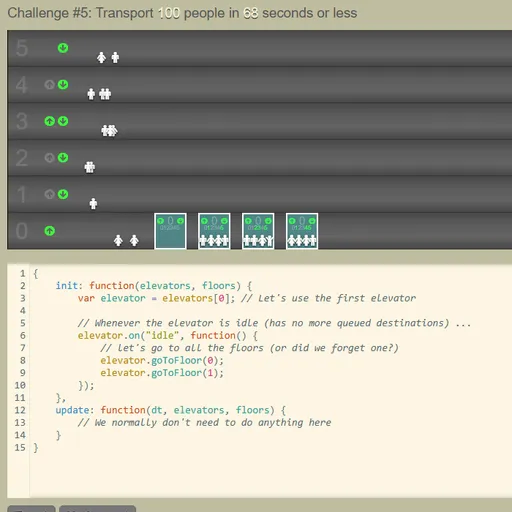
Elevator Saga is a programming puzzle where you never press an elevator button yourself. Instead, you write a short JavaScript program that tells each car where to go, then watch little riders pile in and out as your logic runs. Each challenge sets a goal, such as moving a certain number of people within a time limit. Weak code leaves riders stranded, so you keep refining it.
How to Play Elevator Saga
The top half shows the building, where riders appear and press up or down. Below it is a code editor that starts with a working but weak program. It must be an object with two functions: init, which runs once when the challenge begins, and update, which runs again and again while time passes.
Most of your logic goes in init. There you attach listeners such as idle, floor_button_pressed or stopped_at_floor to each elevator, and up_button_pressed or down_button_pressed to each floor. Inside them you call methods like goToFloor(), check loadFactor() to see how full a car is, or edit the destinationQueue.
There are 18 graded challenges. Early ones have one car and a few floors. Later ones add more cars with different capacities, up to 21 floors. Some goals count elapsed seconds, some limit how many floors your cars may travel, and others fail you if anyone waits too long. A final 19th stage is an endless demo with no goal.
Elevator Saga Controls
| Action | Keyboard | Mouse |
|---|---|---|
| Type and edit your elevator program | Type in the code editor (Tab inserts four spaces) | Click inside the editor to place the cursor |
| Run your code from the start of the challenge | — | Click "Apply" |
| Start, pause or restart the simulation | — | Click the Start / Pause / Restart button |
| Change simulation speed | — | Click the minus or plus icon next to the speed number |
| Go to the next challenge after a win | — | Click "Next challenge" |
| Save, reset, or bring back code from before a reset | — | Click "Save", "Reset" or "Undo reset" |
Tips and Strategies
- Fix the starter code first. It only visits floors 0 and 1, so riders on the top floor are ignored. Listening for
floor_button_pressedand sending the car to the requested floor is a solid first upgrade. - Answer hall calls. Use the floor
up_button_pressedanddown_button_pressedevents so empty cars go to where people are waiting. - Skip stops when a car is full. Check
loadFactor()before stopping for a pickup, because a packed car cannot take anyone else. - Watch the goal type. Challenges with a move limit punish extra trips, so wait for several riders instead of rushing back and forth.
- Speed up testing. Raise the time scale to see quickly whether a strategy holds up, then slow it down to spot where riders get stuck.
Features
- Real code editor: line numbers, syntax colors and automatic closing brackets.
- Built-in Help page: a full list of elevator and floor functions and events, with examples.
- Adjustable time scale: run the simulation at speeds from 1x up to 55x.
- Live statistics: riders moved, riders per second, average and maximum wait, and total moves.
- Saved progress: your program stays in the browser between visits, and the speed setting is remembered too.
Tested and updated: